
Aurobindo Nayak
Customer Connect by VMware | 2020
VMware Customer Connect is VMware's unified, digital self-service portal that rebranded and modernized the former "My VMware" user portal. It provides a single access point for customers to evaluate products, download software and updates, manage software licenses, submit and track support requests, and handle account management tasks. The platform uses advanced technologies to deliver a fast, secure, and seamless user experience—incorporating AI-driven support, improved UI, and personalized features for easier navigation and automation of common customer needs.
Need for a change from My Vmware to Customer Connect
The change from "My VMware" to "Customer Connect" was part of a strategic effort to modernize and unify VMware's customer digital experience. The "My VMware" portal, which had served users for over a decade, faced challenges such as exponential growth in traffic, performance and scalability problems, and a legacy architecture that made it difficult to add new features and maintain optimal user experience.
To address these issues, VMware developed Customer Connect as an upgraded portal to simplify, personalize, and improve performance, offering a refreshed user interface, streamlined access to resources, and enhanced convenience to match modern consumer expectations. The rebranding also aligned with a move toward more integrated digital engagement, such as single sign-on and new learning resources.
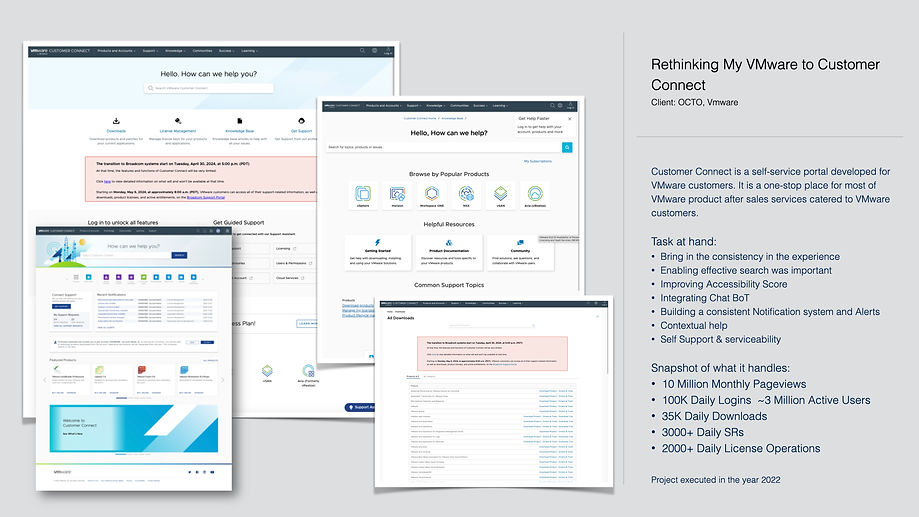
What does the site handle
-
10 Million Monthly Pageviews
-
100K Daily Logins ~3 Million Active Users
-
35K Daily Downloads
-
3000+ Daily SRs
-
2000+ Daily License Operations
Business goals / key drivers of the change to rebrand MyVmware to Customer Connect
Digital Modernization
VMware aimed to move away from legacy systems that could not support rapid growth, launching Customer Connect as a scalable, high-performing portal that supports future innovation and integration with emerging technologies.
Enhanced Customer Experience
A major objective was to streamline and personalize the customer journey by offering intuitive navigation, self-service options, and faster, AI-assisted support resources. Customer Connect provides seamless, centralized access to licensing, downloads, support, and learning—all in one unified location.
Effortless Integration and Engagement
With the rise of cloud solutions, the rebrand allowed VMware to better integrate its services and support with broader enterprise platforms, enabling easier engagement for both direct customers and partners. Features such as single sign-on and consolidated access further improve business efficiency and user satisfaction.
Quick look at the legacy portal - My VMware

Foray into tailored Design Process
Being new to the Customer Connect Space where some were already experts, We started with recording observations, design debt and backlogs, past user research data and analysis.
Later tailored few design approaches based on the need. Highlighting a few.

EXPERT
REVIEWS

STAKEHOLDER
INSIGHTS

CO-CREATE SESSIONS
CTAB SESSIONS

USABILITY
SESSIONS

UNIQUE PATTERN LIBRARIES


ACCESSIBILITY INCLUSION

INSIGHTS from LOGS, BUSINESS DATA, NPS SCORES

CONTEXTUAL
ENQUIRIES
Insights from Initial Investigations
Moving Folders
The portal is able to move only one folder at a time. While Users can select multiple folder, but they cannot move multiple folders at one time.
Missing Entitlements: Are you Looking at the Right Account
Users can be granted access to multiple accounts. As a result when they log into the portal they may not see the licenses/ contracts/ orders that you are looking for.
Super User: Bulk Changing of Permissions
My VMware doesn’t allow bulk changing of permissions across folders.
Searching License Keys:
As of publishing, Users can’t search license keys based on the “Notes” field. Many clients use this field to organize their license keys in the old license portal by placing a business unit or group tag within the field. Since one cannot search the license keys based upon this field, organizing keys takes more time as users will have to expand each license key while organizing.
Adding Notes to Split License Keys:
If the user uses the notes field as part of license key tracking or management, then they have to edit the notes for newly generated licenses keys as a second step after they split the original key. The current system doesn’t allow users to add a note to a newly generated license key during the key splitting process
Organizing License Keys from Different Products
Users can only move license keys from one product at a time within the portal. While Users can select multiple license keys for the same product to be moved at once (i.e, vSphere 5), if users switch their view to another product (i.e., vCenter Server 5) they lose all your original selections. They have to organize their vSphere keys and vCenter Server keys in two separate steps.
Design Strategy
The Complexity of the portal, the no's of stakeholder's involved, the urgency of the situation to be able to deliver and to continue to deliver demanded a multifold design approach to be adopted. this led to a 2 pronged Design Strategy.
.png)
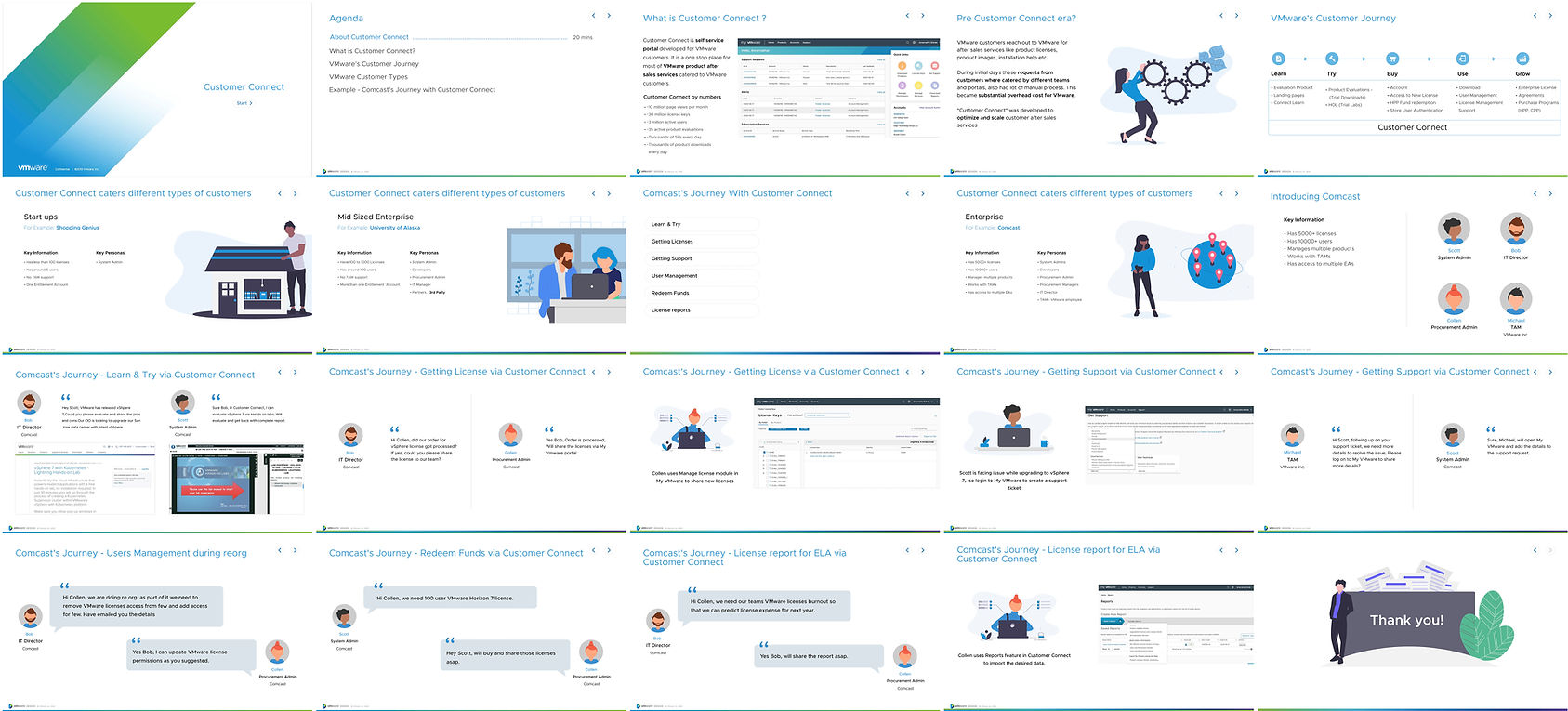
Building End to END Story
End-to-End stories was crucial for understanding, communicating, and improving the complex systems or customer journeys effectively. It ensured all stakeholders see the full picture, driving better outcomes and stronger alignment.

Support Continuous Improvement
Documenting and reviewing end-to-end stories enables teams to learn from experience, iterate, and optimize processes or customer experiences continuously.
Showcase Value and Impact
End-to-end stories demonstrate the real-world impact and value of solutions by showing how challenges are addressed comprehensively, leading to measurable results. They help in communicating the business benefits clearly to decision-makers.
Connect Ecosystem - Service Blueprint
The activity aimed at streamlining and identifying the Connect ecosystem, and the lifecycle of the customer involving Customer Connect and other supporting portals.
The Service Blueprint gave an overview about how, when, where, what our customers do. This view enabled the stakeholders to focus and prioritize the product roadmap.

7
Weeks
5 - 7
Hrs / Week
1
Tool - A4 Sheet / MIRO
3
Sol'n Arch.
5
PM's
3
Designers
7 - 8
Engineering
2 -3
Business & Support
Complete Understanding
Helped stakeholders to understand how different components and stages interconnect and contribute to the overall outcome. This prevents fragmented or siloed thinking and ensures alignment across teams.
Identify Gaps and Opportunities
By mapping the entire journey, teams can identify gaps, pain points, inefficiencies, or risks that might be overlooked when focusing only on individual parts. This insight drives more effective problem-solving and innovation.
Enhance Collaboration and Accountability
These stories foster collaboration across different functions and encourage shared ownership and accountability for the full customer or project lifecycle, rather than isolated tasks.
Quick Glimpse of how the priorities evolved

Stakeholder & Customer responses
Business customers expected the same levels of speed, ease of use, and convenience that they find on a leading consumer website or their smartphone... we refreshed the user interface while accelerating page loads and interactions on the portal." — Senior Director IT, Customer Experience and Success Applications at VMware.
Software license cost savings of 25% annually were achieved by moving away from third-party applications.
The modernization led to about a 25% increase in developer productivity, saving around 1,000 person-hours per year in platform maintenance.
Moving to microservices has greatly simplified and accelerated building, testing, and deploying services. Now we can deploy new features on a daily basis if we need to saving around 1,000 person-hours per year in platform maintenance. — Director, Digital Experience, VMware.in developer productivity,
Performance improvements include a 40% faster service response time and improved service availability to 99.95% uptime.
We get enormous satisfaction when our customers tell us that they’ve noticed improvements that help them realize value faster and more efficiently... We’ve seen a significant increase in positive feedback since we migrated to the modernized support experience that Customer Connect offers.” — VP, VMware.